
Appearance
CP Overview
On the CP page you can modify a couple of things. The CP has three pages: Rules, Settings and Logging.
Settings
All settings except Logging are settings of the Store module itself: when the Shipping module is installed, they are hidden in the Store settings and you manage them here. Changing them here changes them in Store. See What changes in Reinos Store.
Shipping Label (default)
The default label of the shipping option shown during checkout. A rule can override this with its own Shipping label.
Always select first shipping method
When no shipping method has been selected yet, the first available shipping method is selected automatically. This setting is shared with the Store Pickup and My Parcel modules.
Free shipping above
Free shipping above the x amount. If 0 is given, it will not calculate free shipping. The subtotal of the cart (excluding tax) must be higher than this amount.
disable_shipping param
This setting changes how the disable_shipping="yes" param of the add_to_cart tag works:
- Yes: the shipping cost is only removed when all items in the cart have
disable_shipping="yes". - No: the shipping cost is removed as soon as one item in the cart has
disable_shipping="yes".
Default country
Set a default country. A new cart starts with this country as shipping (and billing) country, so the shipping cost can be calculated before the customer has entered a shipping country.
Allowed Countries
Define a set of countries where you want to ship to. This limits the countries in the country select of Store, and the checkout rejects a billing or shipping country outside the list. The rules are not affected, so you also need a rule for every allowed country.
Logging
Logging is available from v2.0.0, older versions don't write any logs.
What should be logged on the Logging page: only errors (default), everything or nothing.
- Only errors: the checkout rejected a shipping method, e.g. the country has no rule or the cart changed after the method was chosen.
- Everything: also a notice when no rule is found for the cart, with the country, the cart weight and the entries. Useful while setting up the rules; a cart without a matching rule logs this on every page that shows the shipping methods.
Rules (previously zones and countries)
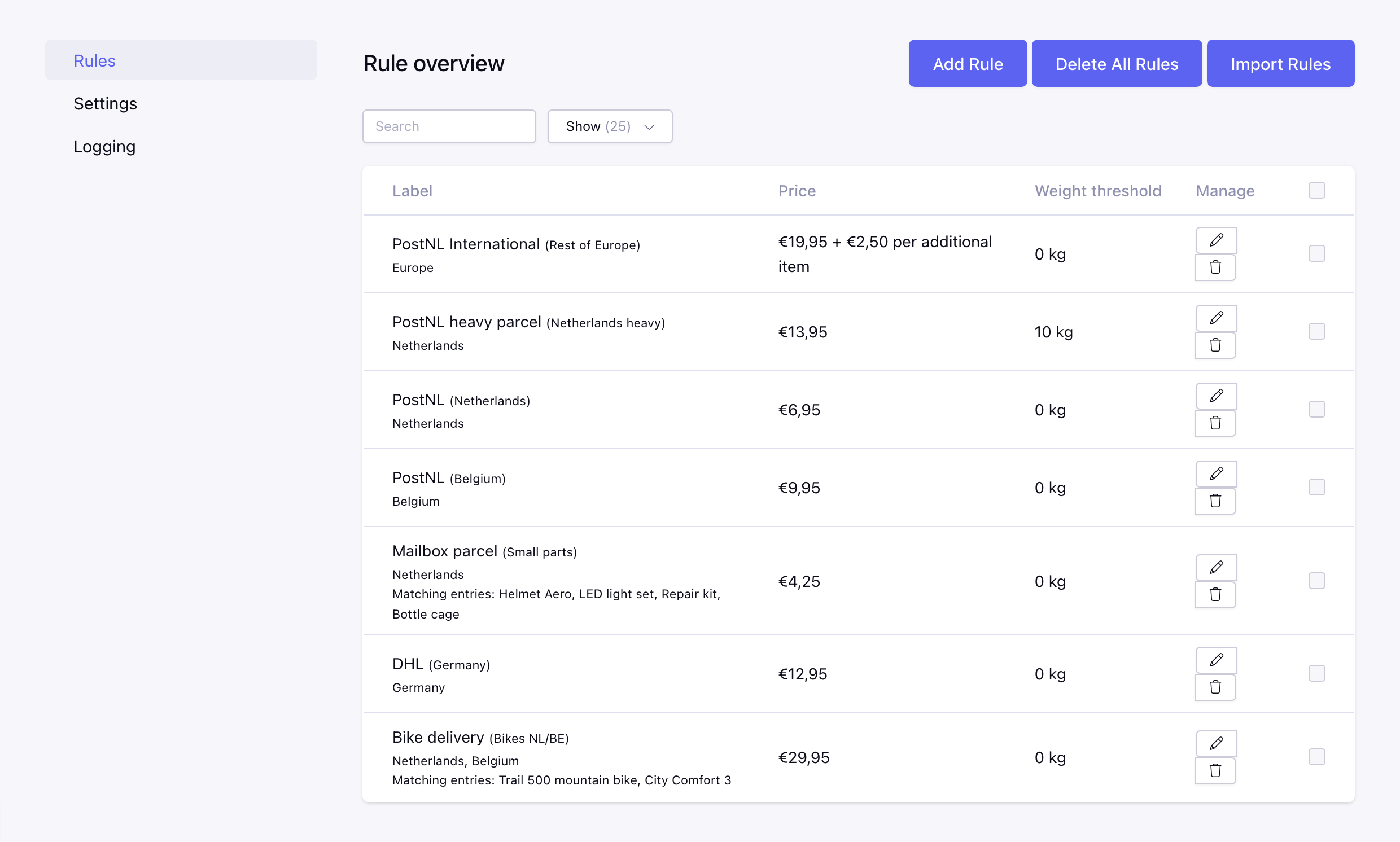
Here you can set your rules. Define to which countries and/or continents you ship and what the price will be.
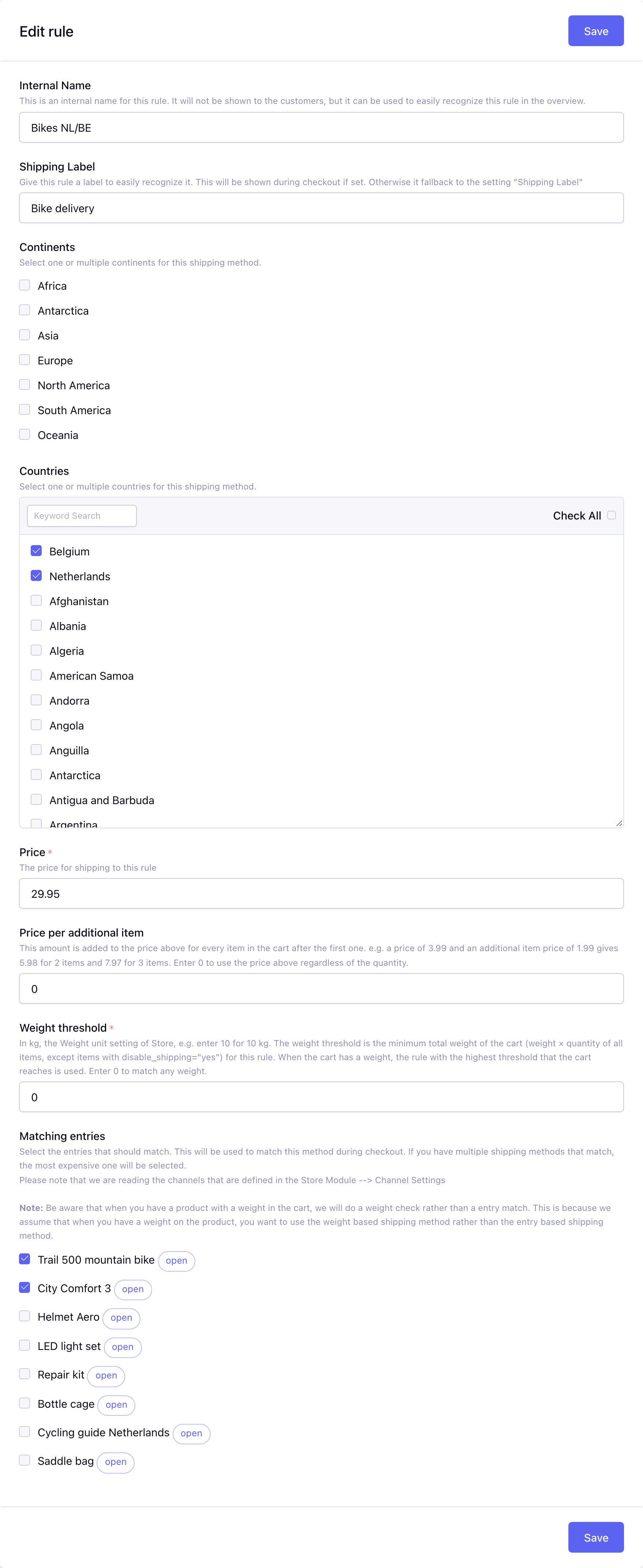
Internal name
This is the name of the rule that will be shown in the CP. This is for internal use only and will not be shown during checkout. e.g. you can use the zone name or country name as internal name to easily recognize it in the CP. At most 100 characters.
Shipping label
Give this rule a label to easily recognize it. This will be shown during checkout if set. Otherwise it fallback to the setting "Shipping Label". The label of the rule (or the Shipping Label when the rule has none) is also saved as the shipping carrier of the order. At most 100 characters.
Continents
Select one or multiple continents for this rule. The rule matches every country on these continents, unless that country has a rule of its own that fits the cart: the rules of the country are checked first, the continent rules are the fallback. One exception: when the cart has no weight, a continent rule with matching entries for a product in the cart wins over a country rule without matching entries (see How the rule is chosen).
Countries
Select one or multiple countries for this rule. A rule needs at least one country or continent; a rule with only continents is fine.
Price
The price for shipping with this rule, 0 or more.
Price per additional item
Available from v2.0.0
This amount (0 or more) is added to the price for every item in the cart after the first one. The quantity of all items in the cart is counted, except items with disable_shipping="yes" (for an order made with Create order in the CP every line counts, see Orders made in the CP). e.g. a price of 3.99 and an additional item price of 1.99 gives 3.99 for 1 item, 5.98 for 2 items and 7.97 for 3 items. Enter 0 to use the price regardless of the quantity.
Weight threshold
The threshold is in the Weight unit of the Store settings (kilogram by default), shown next to the field and in the rules overview (available from v2.0.0), e.g. enter 10 for 10 kg. The weight threshold is the minimum total weight of the cart (weight × quantity of all items, except items with disable_shipping="yes"; with Create order in the CP every line counts) for this rule. When the cart has a weight, the rule with the highest threshold that the cart reaches is used. Enter 0 to match any weight. When the cart has no weight, the threshold is ignored.
Matching entries
Select the entries that should match. The rule matches when at least one of the selected entries is in the cart. This will be used to match this method during checkout. If you have multiple shipping methods that match, the most expensive one for the cart (incl. the price per additional item) will be selected. Please note that we are reading the channels that are defined in the Store Module --> Channel Settings
Note: Be aware that when you have a product with a weight in the cart, we will do a weight check rather than an entry match. This is because we assume that when you have a weight on the product, you want to use the weight based shipping method rather than the entry based shipping method.
Import rules
Import multiple rules at once, one rule per line in the CSV format country_codes;price;weight_threshold;additional_item_price;continents;label;internal_name;matching_entry_ids. Only the first three columns are required, the others are optional (available from v2.0.0):
| Column | Value |
|---|---|
country_codes | The country codes of Store (e.g. NL), multiple codes separated by a pipe. Leave it empty for a rule with only continents. |
price | The price of the rule. |
weight_threshold | The weight threshold, in the Weight unit of Store. |
additional_item_price | The price per additional item, 0 when empty. |
continents | The continents, multiple separated by a pipe: africa, antarctica, asia, europe, north_america, south_america, oceania. |
label | The label shown to the customer, the Shipping Label when empty. At most 100 characters. |
internal_name | The internal name. At most 100 characters. |
matching_entry_ids | The entry IDs of the matching entries, multiple separated by a pipe. |
NL;4.95;0
BE|DE|FR;7.95;0;1.50
NL;9.95;10;0;;Heavy parcel
;12.95;0;0;europe;Europe
NL;25.00;0;0;;Bulky;Bulky products;12|34
Put a value with a ; between double quotes, and a double quote inside it twice: "Express; next day".
The form is filled with your current rules in the same format, so you can add, change or remove a line and import them again without losing anything.
Good to know:
- An import replaces all current rules of the current site.
- Every line is checked first. When a line is not valid, nothing is imported and the current rules stay as they are; the form shows the invalid lines (with their line number) and keeps your text, so you can fix them and import again. A line is not valid when it doesn't have 3 to 8 values (separated by
;), has no country and no continent, has a country code that is not in the country list of Store or an unknown continent, a price, weight threshold or additional item price that is not a number of 0 or more (use a.for decimals, e.g.4.95), a label or internal name longer than 100 characters, or an entry ID that is not a number. - Use the country codes of Store (e.g.
NL,DE), lower case and spaces around the codes are fine. Empty lines are skipped. - The imported rules get new IDs, so a cart that had a rule selected loses that selection and the customer has to choose the shipping method again.
Filter and delete rules
Available from v2.0.0
Search the rules on a keyword: the label, the internal name or a country (name or code). You can also choose how many rules are shown per page. Select rules with the checkboxes and choose Delete in the "with selected" bar to delete them at once.
Delete all rules
Delete all rules of the current site with one action.
How the shipping cost is calculated
The module adds one shipping option to the checkout: the rule that matches the shipping country and the weight (or the products) of the cart. When the cart has a weight, the rule with the highest weight threshold that the cart reaches is used; when it has no weight, the most expensive matching rule is used. When no rule matches, the module doesn't add a shipping option.
See How the rule is chosen for the exact steps, and How does it work for tax, free shipping and the checkout.
Logging
This is where you find the logs of this module, see the Logging setting for what is logged. Use "Delete all logs" to clear the logs of the current site.
Filters
Available from v2.0.0
Filter the logs on severity (error or notice), date (a period or a custom range) and a keyword in the message, and choose how many logs are shown per page. The filters stay active when you sort or go to another page.
Delete logs
Available from v2.0.0
Select logs with the checkboxes and choose Delete in the "with selected" bar to delete them at once.
Export logs
Available from v2.0.0
"Export logs" downloads the logs as a CSV file (separated by ;). The export uses the active filters, so only the filtered logs are exported.