
Appearance
Endpoints
Available from v10.0.0
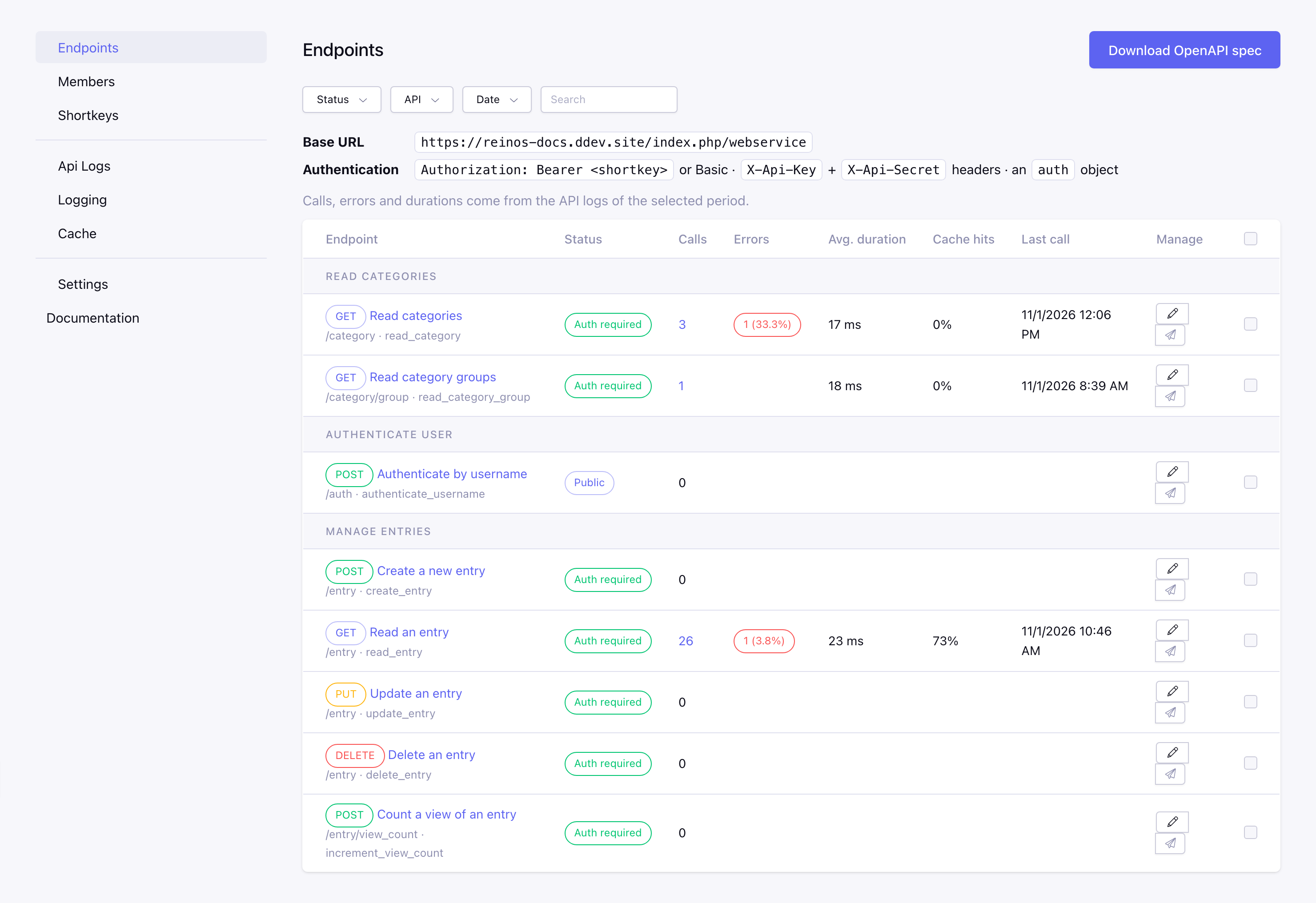
The Endpoints page in the CP shows all endpoints of the installed APIs, grouped per API. Here you can enable or disable an endpoint, or make it public.
Overview
| Column | Description |
|---|---|
| Endpoint | The HTTP method, the name and the route of the endpoint, e.g. GET /entry |
| Status | Auth required, Public or Disabled |
| Calls | The number of calls in the selected period. Click it to see the calls in the API logs. Available from v10.0.0 |
| Errors | The calls with an HTTP status of 400 or higher, with the percentage of the calls. Click it to see these calls in the API logs. Available from v10.0.0 |
| Avg. duration | The average duration of a call in milliseconds, from the start of the request until the response. Available from v10.0.0 |
| Cache hits | The part of the cached calls that was answered from the cache. Available from v10.0.0 |
| Last call | When the endpoint was called last. Available from v10.0.0 |
| Manage | Edit the endpoint, or try it on its Try it page (the paper plane) |
- Filter the endpoints on status, API and keyword. The date filter sets the period of the statistics, without it all kept API logs are counted.
- The statistics come from the API logs of the current site, so Log requests (or Debug) needs to be enabled in the API log settings. How long the logs are kept is set with Keep API logs (days) and Maximum API logs. Logs from before v10.0.0 have no HTTP status and duration, they only count as a call.
- Select endpoints and use the bulk action to Enable, Disable, Make public or Require auth. This also clears the cache of these endpoints.
- Download the OpenAPI specification with the Download OpenAPI spec button.
Above the table are the base URL and the auth methods. Routes that are registered more than once are skipped, with a warning.
Edit an endpoint
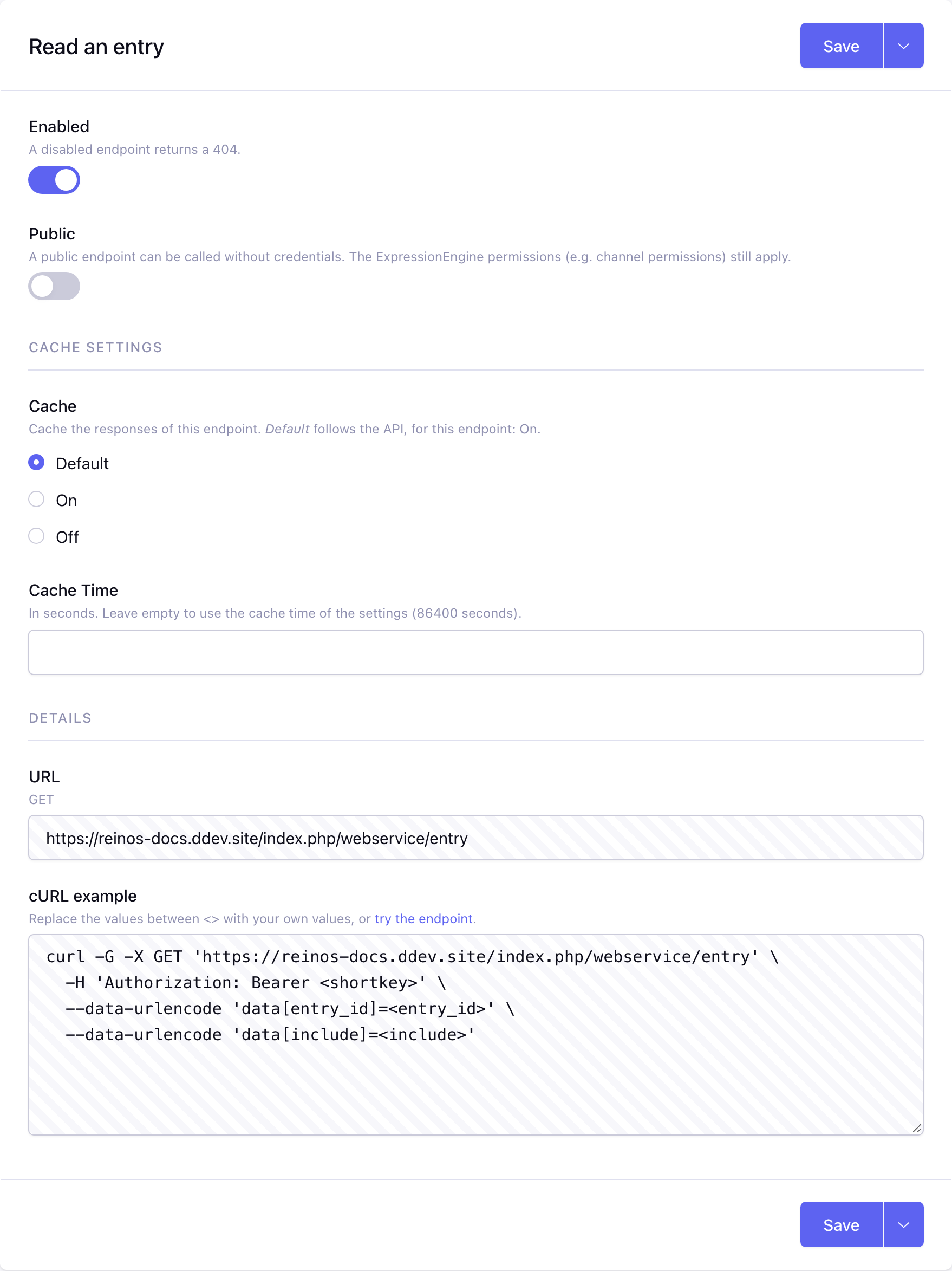
The edit page of an endpoint shows:
| Name | Description |
|---|---|
| Enabled | A disabled endpoint returns a 404 |
| Public | A public endpoint can be called without credentials, see below |
| Cache | Default (what the API declares), On or Off, and a cache time for this endpoint, see Cache. Endpoints that change data are never cached. Available from v10.0.0 |
| URL | The full url of the endpoint |
| cURL example | A cURL example to call the endpoint. Replace the values between <> with your own values, or try the endpoint on its Try it page |
Saving the endpoint clears its cache.
Public endpoints
A public endpoint can be called without credentials. The ExpressionEngine permissions still apply: a request without credentials runs as a guest, so e.g. creating an entry still requires a channel that a guest can post to. Searching entries (e.g. read_entry) as a guest only finds open entries, in every channel. When credentials are given, the request runs as that member, with the same checks as on any other endpoint: the member must be added to the module, be active and have access to the API. Wrong credentials give a 401 and count as a failed authentication for the rate limiting.
On the edit page of an endpoint that changes data (e.g. create_entry), the Public setting has a warning. The bulk action Make public has no warning. The endpoints of an API without auth, like the Auth API, are always public.
The public endpoints replace the Free API(s) setting of earlier versions. The free APIs are migrated when updating to v10.0.0. A free method of the Member API or Comment API stays public: when you turn that API on, its endpoint is public again.
OpenAPI specification
The enabled endpoints can be exported as an OpenAPI 3 specification, e.g. to import them in Postman or to generate a client.
- Download the specification on the Endpoints page with the Download OpenAPI spec button.
- Or enable the setting Public OpenAPI specification (see CP overview) to expose it on
https://your-domain.com/index.php/webservice/openapi.json.
The specification describes the url, the HTTP method, the credentials, the error responses (400, 403, 404, 422, 429 and, for endpoints that require auth, 401) and, when known, the data fields of each endpoint.