
Appearance
Map Markers
The add marker tag for use inside the {exp:reinos_maps:map} tag
The tag
{exp:reinos_maps:map}
    {maps:add_marker}
{/exp:reinos_maps:map}
Tag parameters
Below are the Tag Parameters. Those parameters can be used in the tag described above.
address
The address for the marker
address=""latlng
The latlng for the marker
latlng=""reverse_geocode_latlng
Geocode also latlng coordinates to get the best result
reverse_geocode_latlng="no"animation
enable the animation for the marker, this will drop your marker.
Coming soon
animation="no" [OPTIONAL]tooltip:content
set the tooltip for the marker.
tooltip:content="[location]" [OPTIONAL]tooltip:direction
Direction where to open the tooltip. Possible values are: right, left, top, bottom, center, auto.
auto will dynamically switch between right and left according to the tooltip position on the map.
tooltip:direction="auto" [OPTIONAL]tooltip:permanent
Whether to open the tooltip permanently or only on mouseover.
tooltip:permanent="no" [OPTIONAL]tooltip:sticky
If yes, the tooltip will follow the mouse instead of being fixed at the marker center.
tooltip:sticky="no" [OPTIONAL]icon:url
set icon path for the marker.
icon:url="" [OPTIONAL]icon:offset
Specify the offset in pixel where the icon must show
icon:offset="0,0" [OPTIONAL]icon:size
Set the size for an icon.
icon:size="25,41" [OPTIONAL]icon:shadow:url
set the shadow icon path for the marker.
icon:shadow:url="" [OPTIONAL]icon:shadow:offset
Specify the shadow offset in pixel where the icon must show
icon:shadow:offset="0,0" [OPTIONAL]icon:shadow:size
Set the shadow size for an icon.
icon:shadow:size="" [OPTIONAL]icon:class_name
Set the class for the marker html
icon:class_name="maps_marker" [OPTIONAL]glyph_icon
With Glyph icons you can add Glyph icons to your marker 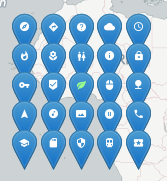
glyph_icon:prefix
Set the prefix. For example, this would be fa for FontAwesome
glyph_icon:prefix="" [OPTIONAL]glyph_icon:name
Set the name of the icon
glyph_icon:name="" [OPTIONAL]glyph_icon:class_name
If you need to add an extra class to the marker.
glyph_icon:class_name="" [OPTIONAL]glyph_icon:color
Set the color of the Glyph icon
glyph_icon:color="#fff" [OPTIONAL]popup:content
The content for the popup (infowindow) e.g: <h1>Yeah [location]</h1>
Variables : [location] [route_to_url] [route_from_url] [map_url] [elevation] [address] [street_name] [street_number] [city] [country] [country_code] [zipcode]
Note[elevation] is only accessible when you set the get_elevation="yes" param
Note using the latlng and omit the reverse_geocode_latlng param to set to yes, you wont get any geocoding vars
popup:content="" [OPTIONAL]popup:offset
Specify the offset in pixel where the popup must show
popup:offset="0,0" [OPTIONAL]popup:max_width
Specify the max width for the popup
popup:max_width="400" [OPTIONAL]popup:min_width
Specify the min width for the popup
popup:min_width="200" [OPTIONAL]popup:open_on_hover
Open the popup on hover
popup:open_on_hover="no" [OPTIONAL]popup:open_by_default
Open the popup by default
possible values no|yes
popup:open_by_default="yes" [OPTIONAL]popup:auto_close
Close the popup when another popup is opened.
In case if you want to open 2 or more popups by default, you can combine this with popup:open_by_default="yes"
possible values no|yes
popup:open_by_default="yes" [OPTIONAL]keys
To get the marker via the api, you have to enter the key for you marker. By default the keys are generated for you based on the address, number and latlng. To extend this with your own keys, you can use this param.
Use a colon : to give it multiple keys
keys="key1_for_the_first_marker:key2_for_the_first_marker" [OPTIONAL]get_elevation
Get the elevation so you can use the [elevation] variable in the Popups (only availble with the maps_service module installed)
possible values no|yes
get_elevation="no" [OPTIONAL]reverse_geocoding_latlng
Reverse geocoding, so latlng coordinates are geocoded to get the best known location.
possible values no|yes
reverse_geocoding_latlng="no" [OPTIONAL]link:url
Set a URL where the marker goes on marker click
link:url=""link:new_tab
How to open the link
possible values no|yes
link:new_tab="no" [OPTIONAL]